Showing posts with label Cindy Ho Designs. Show all posts

Wednesday, November 8, 2017

Delivery of the Glowforge

I last updated stating I received my Glowforge in this blog post here. 

Glowforge is currently focussed to shipping to their Amercian customers.  As a Canadian and who also works in the same industry as FLEX, I anticipated this and had mine shipped to a US mailbox and hoped the exchange rate stays towards my favour when I need to pay the taxes

The past few weeks, there’s been dozons of complains of how the shipments seems come in with surprisng amount of damage beyond the expected wear and tear of gound transit.  When mine arrived, I was releived that the package actually came in good shape

20171107_081928UPS delivered or the mail post box stored my box upside down.  It’s upsetting that those ‘This side up’ stickers was obviously ignored.  I was pretty worried about it.  There’s an internal cooling system and what if that leaked?   What if that put pressure on the internal parts, especially the tube?  Nothing could be done about that then so off we went back home.

Funny though, when we returned to Canada, the officer seemed suprised when declared “Laser Cutter”.  I was a little worried, but he sent us in to pay the taxes and we were on our way!

I’m not going to bore you with any unboxing videos as there were equally excited owners out there who already took the time. There’s two good ones so hyou get a sense of the size

From Tom Stringham.  He recorded with a headband camera

Or from Zach Malloch. 

Since the machine was delivered upside down, the warning note inside stating to read the manual first got shifted and fell into the box where I didn’t see it.  Please note, please:

Read the MANUAL

There’s a specific order to unpackage and set up the unit.  Had I not watched those videos before hand, I’m pretty sure I would have broke something.  The Glowforge in a temporaty home in the family garage.  Due to restricted living quarters, I wasn’t able to set up my studio.  I’ll take those photos when she’s moved to her final place.   

Monday, October 16, 2017

Thoughts about the GlowForge

RCaptureecall back in 2015 how excited I was to invest in the crowdfunding campaign to purchase a Glowforge.  By Oct 11, 2017, two years to the day I placed my order, I still haven’t received my machine.   During this period of time, the company has delayed shipping several times due to parts, design, logistics issues and many other reasons.  Each time resulting in disappointment.  Review the forums, many owners are simply fed up, some cancelled, some complain, many hanging on.

I’m in the group who stayed with it for the long hual.  Admittingly, I needed encouragement to avoid cancelling.  However, I try and remind myself that it’ll be worth it.  Here’s my personal reasons:

We can afford to wait

The money did not come out of the family budget, it came out of my profits out of Cindy Ho Designs. Even if I did use family funds, my husband would have supported the purchase.  He always say thatI never spoil myself.    Some owners took out loans or sold personal posessions in order to get into the initial crowdfunding.  Many took on embarrassment and conflict from friends and spouses.

Glowforge has a Business Plan

Startups are always poise some risk, especially when they have to rely on crowdfunding.  Look what happened to TIKO3D, who ran out of money as a result of the founder’s inexperience and arrogance. 

I researched the founders and the investers before placing my order.  I felt confident they will produce as promised.  I also researched TIKO3D.  I invested feeling that was a good chance I wouldn’t reap the reward. 

Disclaimer: I was one of the lucky few who actually received the TIKO3D.  It’s a nice product, it’s too bad that they failed their venture.

The Glowforge is still a really great deal

A similar machine was $5000 to $8000 in 2015.   I purchased this machine for just under $2000 with shipping included.   Even with the delays, the Glowforge is still a great deal.  Also with the purchase if you can get 10 new customers sign up through your referral link you’d get $100 discount for up to 10 new customers.  I was lucky enough to get 10 (so far).  If they don’t cancel before they receive their units, the machine will only be $1000 plus import tax

Production Units are Shipping

Owners has been posting their feedback online and in the forums.  Most are loving their machines and sharing their experiences.  When you see the potential and hearling people using their machines reignites my excitement as I know the machine exists.

Glowforge are Quick to Resolve Issues

There were a few machines damaged during shipping, one actually had the glass lid and tube smashed.  That’s the fault of the courier but Glowforge were quick to jump to replace or correct the problem

Was there a moment that I wanted to cancel?   

The only true time I was angry after waiting over a year.  Glowforge announced users had to return their machines to them to replace the tubes when they wear out.  After the warrently period, the shipping cost is on the customer.  If outside the USA during the warrenty period, all shipping cost are on the customer.     There was no way I was going to ship my 32 kilogram (70 pound) machine for tube replacement.  Anytime you move anything, there’s always risk of damage and the shipping cost would have been at least $300-$500.  In one announcement they shut out all International customers as the cost was too high.  This caused enough uproar thath Glowforge resinded and will figure out how to instruct the users to replace these tubes themselves.

Do I still think holding out is it worth it?

When I wrote the above, it’s been in draft for a few weeks as I haven’t had alot of time to write.  Guess what, I received the machine!  After all the heartache and negative emotions:

YES IT IS WORTH THE WAIT

I’ve only been using it for a couple of days now, however, so far, it’s been great!  I will be writing more on my experiences with this machine as my time allows, however, if you want to see projects on the go, please follow my Instagram account: @CindyHoDesigns.  If you have any feedback or suggestions, please let me know. 

For any of you are holding out, please hang in there


Saturday, September 30, 2017

Inktober 2017 Challenge


It’s amazing how life just derails you.  Things has slowed down the last months as I needed to take a break from Cindy Ho Designs.  I wasn’t enjoying it anymore.  I still love the making and designing, but the business side I lost the passion.  When one starts dreading the mundane side of entrepreneurship that is necessary to build a successful business, it’s best to take a break.  2017 has been a little dismal in sales, but a wonderful recharge to the passion.  

Now that I’m trying to “bring it on” again, I’m not sure how to go about it. I want to design, but I want to learn someting new but I’m not ready to dive back into being a business woman again but I want to showcase what I can do to any audience who may like my work, even though I’m always a work in progress.

Then I realized it’s the fall and it’s an opportunity for me to give this a shot. This year I’m going to attempt: 78315df6f0f901f4-weblogo

Inktober was a personal challenge by a great artist, Jake Parker, in 2009 so he could improve and develop his drawing skills and he started posting his work on social media. I first learned about it in 2015 when I started

Technorati Tags:
to follow illustrators on Instagram when they were taking on the challenge that year.  I tried it in 2016 but failed miserably as I just gave too many excuses not to draw each day. 

I’m going to attempt to draw at least once every other day and see how much I improve from Day 1.

I admit, I’m not following the rules as you are supposed to be drawing something in ink on paper.  The traditional way.  However, I really want my develop my skills on a digital canvas.

Wish me luck!  Please follow my attempts on my Instagram account user name @CindyHoDesigns

Wednesday, January 20, 2016

Cindy Ho Designs – Year Two

Still a full time mom and still have my full time career but Cindy Ho Designs has gotten busier.   In order to keep organized, in the first quarter of this year my shop was split into three categories.

  1. Foils and Artwork – www.cindyhodesigns.com
  2. Decals and Stickers - cindyhodecals.etsy.com
  3. Craft Supplies – cindyhosupplies.etsy.com

untitled[5]This also helped me service my customers better since each store offer very different things.  Also I’ve been freelancing making handmade greeting cards which developed my designing skills.

It’s been a great experience so far.   The profits from my shop has paid for all my tools without dipping into the family budget.  Back in October, I preordered a Glowforge laser cutter without hesitation.  This has been my largest investment yet and I didn’t few it as a ‘toy’.  I viewed the unit as opportunity to expand on my dream.  I’m a little nervous as it’s a whole new learning curve, but I know this is perfect stepping stone toward my goals.

For those who like my work or ordered my designs,

Thank You! 

2016-01-05_23.21.45

Friday, December 25, 2015

Jewel – Husky Digital Cutting File

il_570xN_680356803_johy

A couple of years ago,  Ana asked to make a custom family Christmas card for her.  She’s one of the most vibrant ladies I’ve ever met.  She had a sweet husky named Jewel.

I generally prefer designing my own cutting files, however, she didn’t give me a lot of time to design her and her son. So I purchased some ready made files from SVG Cutting Files and made some adjustments to suit so they represented her family well.  This site is a great for any owner of a desktop digital cutter.    Their files fully editable so you can customize your creations. 

Jewel, however, I wanted to make my own cutting file as I couldn’t find cutting file that matched the SVG ones purchased.  I took heavy reference to a cute husky drawing done by a talented artist with the handle Gingalengendamterasu on Deviantart.  It was a frustrating but wonderful challenge to recreate the husky as a paper cut project.  The project ended up wonderfully.

Friday, December 18, 2015

Buying Handmade Cards – It’s Only Paper!

imageI’m writing my own take on what you are really paying for when buying handmade.  If you happen to follow my Instagram account, lately I’ve been posting handmade greeting cards.  Contrary to popular belief, I don’t sell handmade greeting cards.   I enjoy making them and pride goes into each one, but not to include in my Cindy Ho Designs product line.  I don’t enjoy making them for other people.  The time and the money spent on materials, I’d want a minimum of $10 to $15 for custom card work, which 80% of those who ask are caught off guard with sticker shock and try to negotiate! 

“It’s only paper!”

“I can buy that from Walmart for $3.00”

“I can make that myself!”

“What?  I should get a discount, I’m your friend!”

I’m the type of person who can stand firm and move on if the project doesn’t happen.  Offended, yes, but try not to show it.  For many sellers, these comments hits them in the heart like an insult and they can fester.  

“How could these people trivialize the heart and soul put into this piece of art?”  

These customers are not in your target market anyway.  I do admit when these people react in a way that my art has no value and calling it ugly that stings like someone throwing sand in my eyes.

Side note:  There’s many artists out there who make really nice handmade cards that are much nicer then mine.  Okay, on that note, I’m plugging  Lucky Charms Card Collection.  Her cards are nicer because that’s her passion.  Tell her ‘hi’ for me!

Back to the topic.  When buying handmade, take into consideration the quality of materials, expertise, time and love imagespent for the artisan to create an original and unique work of art.   For a one off custom design by me, it takes at least an hour, hence the $10 to $15 price tag.  That’s barely minimum wage.

If you wondering why I even take on cards orders at all?  Honestly, it’s good seed revenue for the shop and helps build up a indirect portfolio to showcase my style.   I also love the designing step, transferring it into a cutting or illustration design.    If I choose to take on a project that pays me way below living wage, it is to design for future products.

Friday, November 27, 2015

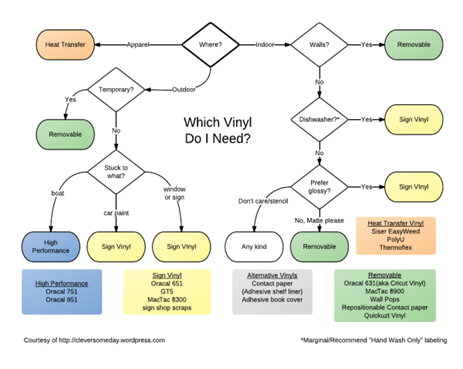
Which Vinyl Do I Need?

For awhile I was experimenting with vinyl cutting with some scraps that I was lucky to rescue from the recycling bin at my work.  When I purchased my BossKut Cutter, it was originally intended just for paper and cardstock.  Sticker cutting was not part of the plan.  When I decided to get into producing and selling some decals, then it became research to finding the best vinyl to use for my customers.   I found that this flowchart created by a great blog Clever Some Day easily sums up what is the best vinyl for your application.  If you follow the link, she has a PDF that you can download and print for your reference. 

untitled

Friday, November 13, 2015

Learning to Work in an Open Environment

il_570xN_831935110_6tpjFor those who know me very well, I’m a extremely introverted person..  I try to portray a friendly open extrovert at work but for the most part, I rather just go to work, do the job and go home to my family.  

I work at a 3rd Tier Electronics Company Manufacturer and the culture style is an open environment.  The primary purpose of offices who adopt an open environment workspace is to make is easy for team members to have open communication and easy collaboration of ideas.  This isn’t for everyone.  There are more distractions, noisy and more transparency between colleagues.  However despite the potential drawbacks, it’s an environment that works for my company and most of us thrive in this culture.

As a introvert, I had to adapt and developed a few things that helped me focus at the tasks on hand

Develop a ‘Invisible Wall’

People chat more in a open environment and often a lot longer then talking about the weather.  To get out of these conversations, these often work:

  • Wearing headphones
  • Put up a sign
  • Block it out on your calendar (to avoid people booking your time)
  • If you use intercompany communicator – set yourself as ‘busy’
  • Close your email software – if it’s an emergency, they’ll find you

Step Away from the Desk

None of us are chained at our desks.  For more in-depth conversation with details that shouldn’t be shared, have it at a coffee shop or a spare meeting room.  Sometimes I borrow a company laptop and I work in spare room from time to time.

Personalize Your Work Space

Since we are at work 30% of the time 5 days a week, it’s natural to want to enjoy our space.  Bring a plant, small aquarium, pictures or decorations, things that that are acceptable for your company.

For me, I have a Lego mini-figure collection based on the Marvell super heroes.  Yes, I do play with them

Work During Quieter Times

Adjust your hours when it’s more quiet, maybe earlier before most people arrive or later when most people left for the day.  This ensures interruption time to focus on your projects.  Or once in a while and if you have work that flexible enough, work from home.

Friday, November 6, 2015

Banned Laser Cutting and Engraving Material

* Jumping on Soapbox *

One of the first things we need to know before even using any laser is what material you can or shouldn’t engrave or cut.  When you receive your Glowforge or any other laser cutting machine, the temptation of “playing with your new toy” is so tempting. 

This is NOT A TOY. 

Anyone wants to play without reading the manual and understanding the hazards are at risk for self injury, injury of others and danger of a fire

* Jumps off the Soapbox *

I apologize, this is in response after reading the community forums on both Etsy and Glowforge citing how excited they are about their machine or rejecting it because of how dangerous they feel it is.  My fear is people not reading the manual and cut material that will seriously harm them, children or even burn down their homes.  I don’t want to project my paranoia to you, but I rather make us novices stop and think.  As devil’s advocate, if you follow precautions, a laser machine will be very safe as long as you keep an eye on it while it’s running

On to the subject of this post:

I thought I could do is cut my decal designs and replace my BossKut machine if I figured out not cut past the liner.  The decals will be much more precise and could sell much more complicated designs.  Unfortunately, it’s not going to happen.  I read on the forums a big warning from more experienced users not to cut PVC.  PVC will emit chlorine gas which will damage your lungs and corrode the machine.  

So since vinyl cannot be put into a laser machine, I wanted to know what else couldn’t.  Below is a list summarized after finding these repeated among many different laser services and manufacturers as extremely hazardous to humans and the machine

Material

Health & Danger Issues

Material & Machine Issues

Examples

PVC (Poly Vinyl Chloride)

Vinyl

Pleather

Artificial leather

Emits pure

chlorine gas

Ruins optics

Corrodes metal

damages motion control system


It’s the most widely used plastic.  Good list of examples on
Mommy’s Footprint Blog

Polycarbonate / Lexan

Catches fire

Absorbs infrared radiation

Cuts Poorly

Discolors


Water Bottles
Greenhouses
CD, DVD, Blue Ray
Safety Googles

ABS (Acrylonitrile Butadiene Styrene)

Emits cyanide gas

Melts

Cuts poorly

Melts doesn't vaporize

Melted material deposit will burn inside the machine


Lego
Some 3D Printing Filaments
Toy instruments
Pipes

HDPE (High-density polyethylene)

Catches fire

melts

Melts doesn't vaporize

Melted material deposit will burn inside the machine


Milk bottles
Water Jugs
Household cleaner bottles
margarine tubs

Polystyrene Foam

Catches fire

melts

Melts doesn't vaporize

Melted material deposit will burn inside the machine


Foam packaging, Styofoam takeout containers and cups
craft pompoms
reusable bags

Polypropylene Foam

Catches fire

melts

Melts doesn't vaporize

Melted material deposit will burn inside the machine


construction insulation

Fiberglass

Emits fumes

Glass cannot be cut

Epoxy emits the fumes


pools
boats
car parts
insulation

Carbon Fiber

Emits noxious fumes

Carbon fiber cuts poorly

car parts
pools
bathtubs

Friday, October 30, 2015

Learning about Lasers: Laser Categories

Ever since pre-ordering the Glowforge, I’ve been obsessed about learning more about laser cutting and etching equipment.  It’s the largest expense made to date so I wanted to ensure I know how to take care of it.  Since Glowforge is so new, they haven’t finalized their design yet.  No online manuals yet for us.  The internet contains a wealth of information.  The Glowforge machine is really a scaled down version of the industrial machine.

Since I’m reading up on it anyway, why not share some of the knowledge with beginners just like me.  If you have any feedback and / or comments, please let me know!

Glowforge offers a Class I laser and a Class 4 laser

  • Class I (Basic model) means you don’t have to take additional safety precautions to be safe
  • Class 4 (Pro Model) means you have to take precautions like posting warning signs and wear proper safety glasses

I’m looking forward to reading Glowforge’s safety precautions about it when it become available.  However, it’s good to know about all the classes so you know where your machine fits in the industry.  So I copied and pasted this excerpt that I found very helpful from the Ackland’s Grainger Website. 

Disclaimer: I’m not an expert and you must always refer to the guidelines from the manufacture or your machine or their website for your safety and safety of those around you.

Laser Categories (Excerpted from Acklands Grainger):

Vision damage can occur from directly viewing the laser source or if the laser beam hits the eye. Damage is usually severe, and may result in blindness, which is why direct viewing of the laser source and its reflections should be avoided. A laser's reflective beam intensity may equal its direct beam intensity; therefore, no reflective objects or surfaces should be in the area with the laser.

Light is radiant energy and is defined as electromagnetic radiation. It is measured in wavelengths and described in nanometers (nm). A laser produces an intense beam of light of a single wavelength (or color) and frequency. Laser intensity varies from low power (Class 1, 2, and 3A lasers), to medium (Class 3B) to high power (Class 4). The American National Standards Institute (ANSI) classifies lasers into categories and gives guidelines on laser safety in the standard Z136.1. Following are laser categories as outlined by ANSI.

Class 1: Cannot emit laser radiation at known hazard levels. Users of Class 1 lasers are generally exempt from radiation hazard controls during operation and maintenance, but not necessarily during service. Most Class 1 industrial lasers consist of a higher class laser enclosed in a properly interlocked and labeled protective enclosure.

Class 2: Low-power visible lasers. Emit laser radiation above Class 1 levels and radiant power not above 1mW. The human aversion reaction to bright light will protect the person from this low level. Example: a supermarket laser scanner.

Class 3A: Intermediate-power lasers. Only hazardous for intrabeam viewing. Some limited controls are usually recommended. Example: a helium-neon laser used in the construction industry.

Class 3B: Moderate-power lasers. Not generally a fire hazard and not capable of producing a hazardous diffuse reflection, except in instances of intentional staring at distances close to the diffuser. Specific controls are recommended.

Class 4: High–power lasers. Hazardous to view under any condition (directly or diffusely scattered). Potential fire hazard and a skin hazard. Significant controls are required for Class 4 laser facilities. Example: an Excimer laser operating in the ultraviolet.

A laser's danger varies depending on which area of the light spectrum it is generating. The ultraviolet radiation laser (180-400nm) causes corneal burns. Lasers in the near-infrared region (780-1800nm) cause retinal damage. These are usually Class 2, 3A, 3B and 4 lasers. The high-powered lasers, Class 3B and 4, can also cause electrical shock and skin burns. A skin cover, like opaque gloves and tightly woven fabrics, and or a "sun screen" may be recommended.

A laser consists of a resonant optical cavity filled with an active medium. The medium is acted upon by some source of excitation energy. The media could be one of three types: a solid state, a gaseous state, or a semiconductor or injection-type. Solid lasers use a crystal, e.g., ruby, glass or a semiconductor (argon) as the light amplifying substance, producing a pulsating laser beam. A gaseous state laser (helium-neon) produces a continuous beam.

For information on the laser’s wattage or power of the laser, refer to the instruction/maintenance manual.

Thursday, October 29, 2015

Thank You for the Support for a Glowforge

untitled

Over one week ago, I announced I preordered Glowforge laser cutter.  For those who helped me out by purchasing through my referral link,

Thank You!

As a small business, even the basic model is a huge investment and each of you made a difference.    Much of my spare time was focused on learning on what I was really getting into.  All the previous research showed meant a lot of tinkering with a low cost offshore machine and learning new software.  After hovering in the forums and watching more videos, I’m convinced that this machine is the right one for me.  I admit one concern the machine is completely wireless – meaning internet is required and designs are transmitted through a cloud.  Glowforge did leave it open source that if they ever go under, then we could still reprogram it so we could continue using it.    That’s something to consider.  For me, I’m pretty rusty in my coding skills, but I still have confidence the company will be around long after the first generation pre-order units have been delivered and they’ll have 2nd and 3rd generations in the years to come.

If you are still thinking of getting your own, you can still get 40% of the retail price on the preorder and if you click on this link here, you can still get $100 off your purchase

Bosskut_Gazelle_Digital_Die_CutterUnfortunately for me, I probably will not receive my unit until sometime in 2016 so it’s going to be a tough time as I have many ideas in my mind that my BossKut Gazzelle isn’t able to do.  In fact, I’m already sketching out ideas and I’m pretty sure I’ll have a few SVGs ready in a few weeks!

Thursday, April 23, 2015

I’ve Never Met a Hater Doing Better Then You

3

When I first started my adventure with Cindy Ho Designs, it wasn’t an easy start.  Many hours designing and perfecting my work on top of setting up my shop on Etsy.  All the while, having others diminish my goals, dreams and classifying my work as a hobby shop.  In their mind, I started this business because I became a mom and started to make crappy craft stuff for a little extra pocket money. 

They got in my head in the beginning.  Today I’ve evolved and now dismiss my haters.   I have more supporters who love what I do.  My first supporters actually are my Creation family! (my day job)  May of my co-workers follow me on Instagram and asked me to make custom cards after posting some on a whim.   My biggest supporter who really helped me hold it together is my wonderful husband.  Couldn’t do it without him.

Monday, January 5, 2015

Happy New Year – Now Let’s Hustle

il_570xN_700065489_pjma  Can you believe that 2015 just crept up on us and we are already a week in!  Amazing.  I hope you all had a wonderful time of rest this past holiday.  One resolution I plan to keep is to hustle more with my foil prints!

Monday, November 24, 2014

Introducing Happy Face Christmas Themed Digital Cutting Files

Recently I’ve been having so much fun designing and hand making greeting cards and gift tags using my cutter using either my Make the Cut or Funtime Software.

Recently, I realized I can convert them to SVGs, which is a very common file used that can be converted for us in many other digital paper cutting machines on the market.  Since Christmas is the next major holiday for us, I took the smiley projects designs to converted them to SVGs and MTC files. Currently available in my Etsy store in time for Christmas.

il_570xN_682226363_oqp7

Happy Face Snowman and Ornament Cutting Files

il_570xN_680355649_lneb

Happy Face Santa and Elf Cutting Files

Tuesday, November 11, 2014

Canada and USA Smiley Faces

Lately I’ve been feeling down.  Not because of anything terrible that has happened.  Just winter is coming, shorter days, rainier, darker, colder etc.   Going against my ultimate personal goal is always be happy. 

So why not start looking at happy faces?  I started to experiment with smiley faces designs and that lead into some cutting files.  I felt a little patriotic this week too!

20141105_220039_1

Monday, November 3, 2014

Canada Post

untitled

As a Canadian trying to make the leap from hobby to small business, you know every penny nickel counts.  Shipping to the USA and overseas can be tricky and more expensive to us compared to our American neighbours.  Myself I’ve underestimated shipping and taken a loss here and there and chalked it up to ‘now I know for next time’

I’ve been working actively on Cindy Ho Designs for one year.  I thought it is time to share what I learned so far about shipping.  The first thing you need to do is research the Canada Post website.  Everything you need to know is there but you will note that it’s not the most user friendly website to navigate.  Only advice is to have the patience and take advantage of the information offered.

Purchase Postage Stamps Online

My first products only required the standard sticker stamps.  It was not a fun errand because every time I went to the post office, there’s always a 10-20 minute line-up and the clerk seems uninterested to provide you the customer service you deserve.  How silly when I found out you can purchase these online and they’ll ship it to you for free if you are not in a rush!  For the past year, I’ve opened an personal account with Canada Post to purchase postage stamps.  I realized halfway through the year that I should have opened a Venture One Account which caters to small business.  A Venture One account opens you up to access special deals and discounts.

Another Tip:  If you shop at Costco, you can purchase a 100 units of domestic stamps at a slightly less then face value.  I don’t recall the exact savings but it was around $3.00 to $4.00 dollars discount

Canada Post Venture One

Go to the Canada Post Website and sign up for a Venture One card.

  • It will get you some discount rates on shipping, but personally I find the PayPal shipping rates to still be lower.
  • Discounts on mailing supplies
  • If you're signed into your Venture One account, you can order mailing label pouches, stickers, stiff shipping envelopes and so on for little or no cost to you.

Shipping Labels

imageGradually I advanced to products that required padding or needs to be boxed.  Just a few years ago, international shipments required a trip to the post office.  The packages measured and weighed before knowing the cost of mailing it to any destination.  With a day job and a full time mom, this was difficult to squeeze that on the ‘to do’ list.  Today with e-commence, you are able to get estimates off the Canada Post website.   With a and even print shipping labels in the comfort of your home or office with a Venture One account.

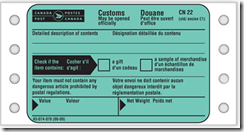
If you ship internationally, you must have the Green Customs Sticker on your package.  If you have a Venture One account, you can order some at no cost or pick up some at your local post office.

Shipping Labels Using PayPal:

If you have PayPal account, you are able to print out Canada Post shipping labels whenever you receive a sale.  The pricing is the same as going to the post office and it’s great as it’s also a custom form if you ship internationally.  Just don’t forget to sign it. 

Note:  the labels print on a 8 x 5 inch size, but there’s confirmation receipt that prints under it.  If you are using Avery labels, it will print on the 2nd half thus wasting a entire sheet.

Shipping Labels Using Etsy

Etsy partnered with Canada Post to streamline the shipping process for their sellers.  When a sale is made, sellers have the option to create the labels and then pay for them when the monthly invoices are due.  I like using them as their labels are sized on a 4 x 6 inch.  This is excellent if you use Avery.  However, my default currency is in US dollars and sometimes you lose out after currency conversion.   I tend to create my label with PayPal since I can pay in Canadian

Shipping Labels Using Canada Post

I have not yet shipped using Canada Post Venture One yet due to the convenience of PayPal and Etsy.  I’ll provide an update when I expand my payment options outside of PayPal. 

What about Oversized Letter mail and Packages?

If you ship a lot of Oversized Letter mail and Light Packet parcels, be aware that 2 centimetres thickness restriction is extremely important. If the thickness is larger then 2 centimetres will push the cost of your package to the more expensive rate.

  • If you consistently trying to measure your package thickness, you can purchase a special plastic template from Canada Post.  Many small business sellers call it the “slot of doom” because when you have one millimetre too thick, they make you pay the more expensive rates. The product number is 540008029.  I don’t have the template since I don’t ship a lot of thick packages yet.  I have a calliper that helps me measure my package heights.  If you like a good inexpensive one, I got mine at Harbor Freight in the USA
  • UPS Express Envelope and DHL Envelopes are exactly 38 CM in length, the maximum allowed length for Canada Post to classify as Letter mail.  Just turn it inside out and re-tape together

I know this really scratches the surface of Canada Post shipping.  I hope however this will help those who are just starting out in small business shipping from Canada to save a little time and money.

Thursday, October 30, 2014

Born a Bitch, Not a Witch

20141025_152947

Earlier this month, my friend and I were having a conversation and realized her birthday is near the end of October.   I asked if her birthday was on Halloween.  Her response, 

“Nope, I was born a Bitch, not a Witch”

Monday, October 27, 2014

Cindy Ho Designs – Year One

I’ve ran two online stores and did freelance work off and on since 2006. I only started taking steps to nudge Cindy Ho Designs to the next level one year ago. With a full time career and being a full time mom, it has been challenging. many late nights and early rises. Many evenings not working on it at all. Some days are discouraging. Same days I feel higher then the stars. For those of you who like my work or ordered my designs, THANK YOU!

925542_327088414130308_282349004_a

Tuesday, October 21, 2014

Wake Up. Kiss Ass. Be Kind. Repeat.

il_570xN_615847509_csuz

This is one of my favourite prints.  I saw this randomly in my LinkedIn news feed.  I know this isn’t an original saying but I love out it turned out.  Something to live by every day.